Cloud-native neural search framework for any kind of data.
Self-host this app for $0.99/mo only!
Build multimodal AI services with cloud native technologies

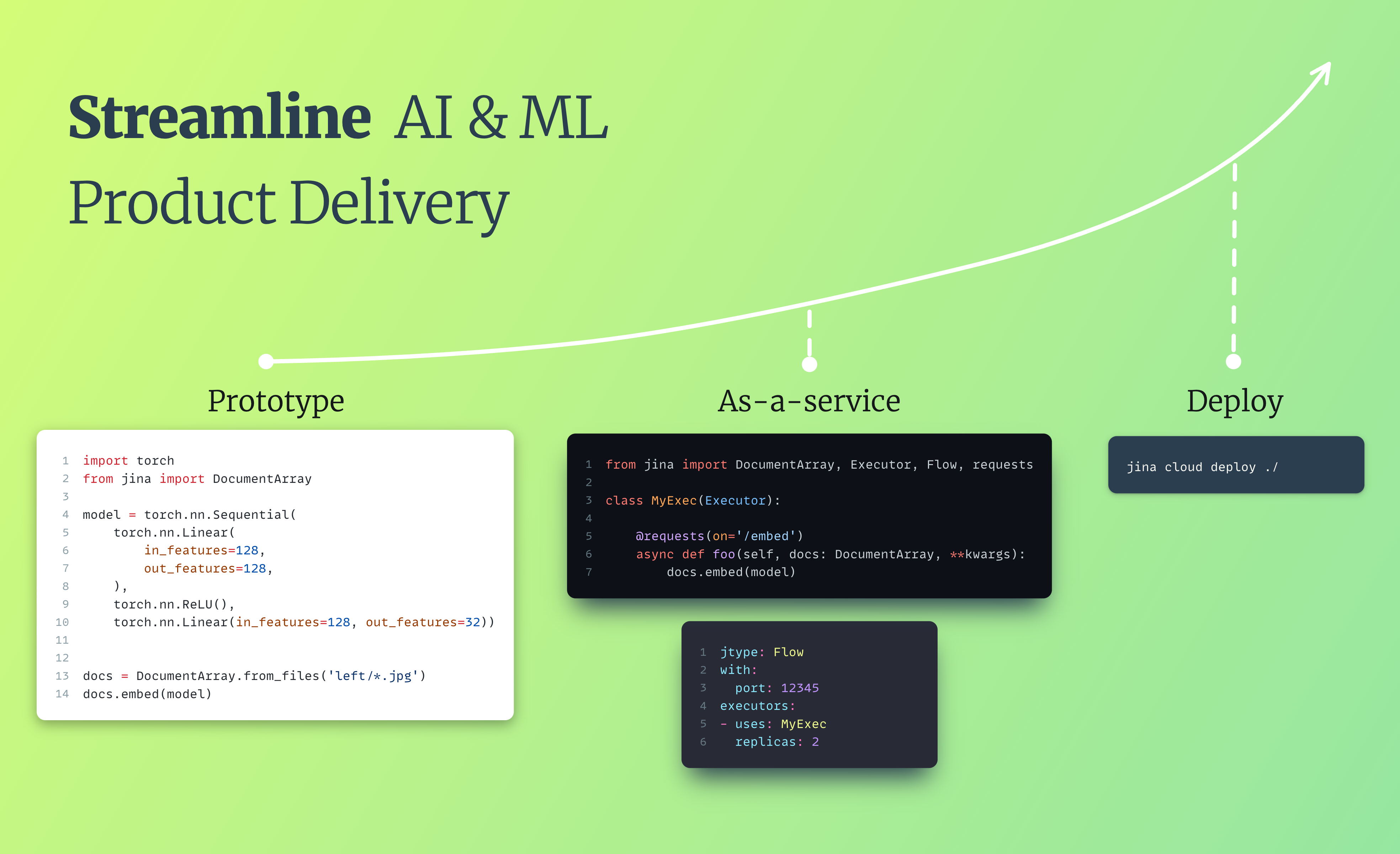
Jina is an MLOps framework to build multimodal AI microservice-based applications written in Python that can communicate via gRPC, HTTP and WebSocket protocols. It allows developers to build and serve **services** and **pipelines** while **scaling** and **deploying** them to a production while removing the complexity, letting them focus on the logic/algorithmic part, saving valuable time and resources for engineering teams. Jina aims to provide a smooth Pythonic experience transitioning from local deployment to deploying to advanced orchestration frameworks such as Docker-Compose, Kubernetes, or Jina AI Cloud. It handles the infrastructure complexity, making advanced solution engineering and cloud-native technologies accessible to every developer.Build and deploy a gRPC microservice • Build and deploy a pipeline
Applications built with Jina enjoy the following features out of the box: 🌌 **Universal** - Build applications that deliver fresh insights from multiple data types such as text, image, audio, video, 3D mesh, PDF with [LF's DocArray](https://github.com/docarray/docarray). - Support for all mainstream deep learning frameworks. - Polyglot gateway that supports gRPC, Websockets, HTTP, GraphQL protocols with TLS. ⚡ **Performance** - Intuitive design pattern for high-performance microservices. - Easy scaling: set replicas, sharding in one line. - Duplex streaming between client and server. - Async and non-blocking data processing over dynamic flows. ☁️ **Cloud native** - Seamless Docker container integration: sharing, exploring, sandboxing, versioning and dependency control via [Executor Hub](https://cloud.jina.ai). - Full observability via OpenTelemetry, Prometheus and Grafana. - Fast deployment to Kubernetes and Docker Compose. 🍱 **Ecosystem** - Improved engineering efficiency thanks to the Jina AI ecosystem, so you can focus on innovating with the data applications you build. - Free CPU/GPU hosting via [Jina AI Cloud](https://cloud.jina.ai). Jina's value proposition may seem quite similar to that of FastAPI. However, there are several fundamental differences: **Data structure and communication protocols** - FastAPI communication relies on Pydantic and Jina relies on [DocArray](https://github.com/docarray/docarray) allowing Jina to support multiple protocols to expose its services. **Advanced orchestration and scaling capabilities** - Jina lets you deploy applications formed from multiple microservices that can be containerized and scaled independently. - Jina allows you to easily containerize and orchestrate your services, providing concurrency and scalability. **Journey to the cloud** - Jina provides a smooth transition from local development (using [DocArray](https://github.com/docarray/docarray)) to local serving using (Jina's orchestration layer) to having production-ready services by using Kubernetes capacity to orchestrate the lifetime of containers. - By using [Jina AI Cloud](https://cloud.jina.ai) you have access to scalable and serverless deployments of your applications in one command. ## [Documentation](https://docs.jina.ai) ## Installpip install jina transformers sentencepiece

Find more install options on [Apple Silicon](https://docs.jina.ai/get-started/install/apple-silicon-m1-m2/)/[Windows](https://docs.jina.ai/get-started/install/windows/).
## Get Started
### Basic Concepts
Jina has four fundamental concepts:
- A [**Document**](https://docarray.jina.ai/) (from [DocArray](https://github.com/docarray/docarray)) is the input/output format in Jina.
- An [**Executor**](https://docs.jina.ai/concepts/serving/executor/) is a Python class that transforms and processes Documents.
- A [**Deployment**](https://docs.jina.ai/concepts/orchestration/deployment) serves a single Executor, while a [**Flow**](https://docs.jina.ai/concepts/orchestration/flow/) serves Executors chained into a pipeline.
[The full glossary is explained here](https://docs.jina.ai/concepts/preliminaries/#).
---
### Build AI Services
[](https://colab.research.google.com/github/jina-ai/jina/blob/master/.github/getting-started/notebook.ipynb)
Let's build a fast, reliable and scalable gRPC-based AI service. In Jina we call this an **[Executor](https://docs.jina.ai/concepts/executor/)**. Our simple Executor will use Facebook's mBART-50 model to translate French to English. We'll then use a **Deployment** to serve it.
> **Note**
> A Deployment serves just one Executor. To combine multiple Executors into a pipeline and serve that, use a [Flow](#build-a-pipeline).
> **Note**
> Run the [code in Colab](https://colab.research.google.com/github/jina-ai/jina/blob/master/.github/getting-started/notebook.ipynb#scrollTo=0l-lkmz4H-jW) to install all dependencies.
Let's implement the service's logic:
translate_executor.py |
|---|
|
Python API: deployment.py |
YAML: deployment.yml |
|---|---|
|
And run the YAML Deployment with the CLI: `jina deployment --uses deployment.yml`
|
──────────────────────────────────────── 🎉 Deployment is ready to serve! ─────────────────────────────────────────
╭────────────── 🔗 Endpoint ───────────────╮
│ ⛓ Protocol GRPC │
│ 🏠 Local 0.0.0.0:12345 │
│ 🔒 Private 172.28.0.12:12345 │
│ 🌍 Public 35.230.97.208:12345 │
╰──────────────────────────────────────────╯
Use [Jina Client](https://docs.jina.ai/concepts/client/) to make requests to the service:
from docarray import Document
from jina import Client
french_text = Document(
text='un astronaut est en train de faire une promenade dans un parc'
)
client = Client(port=12345) # use port from output above
response = client.post(on='/', inputs=[french_text])
print(response[0].text)
an astronaut is walking in a park
> **Note**
> In a notebook, one cannot use `deployment.block()` and then make requests to the client. Please refer to the colab link above for reproducible Jupyter Notebook code snippets.
### Build a pipeline
[](https://colab.research.google.com/github/jina-ai/jina/blob/master/.github/getting-started/notebook.ipynb#scrollTo=YfNm1nScH30U)
Sometimes you want to chain microservices together into a pipeline. That's where a [Flow](https://docs.jina.ai/concepts/flow/) comes in.
A Flow is a [DAG](https://de.wikipedia.org/wiki/DAG) pipeline, composed of a set of steps, It orchestrates a set of [Executors](https://docs.jina.ai/concepts/executor/) and a [Gateway](https://docs.jina.ai/concepts/gateway/) to offer an end-to-end service.
> **Note**
> If you just want to serve a single Executor, you can use a [Deployment](#build-ai--ml-services).
For instance, let's combine [our French translation service](#build-ai--ml-services) with a Stable Diffusion image generation service from Jina AI's [Executor Hub](https://cloud.jina.ai/executors). Chaining these services together into a [Flow](https://docs.jina.ai/concepts/flow/) will give us a multilingual image generation service.
Build the Flow with either Python or YAML:
Python API: flow.py |
YAML: flow.yml |
|---|---|
|
Then run the YAML Flow with the CLI: `jina flow --uses flow.yml`
|
─────────────────────────────────────────── 🎉 Flow is ready to serve! ────────────────────────────────────────────
╭────────────── 🔗 Endpoint ───────────────╮
│ ⛓ Protocol GRPC │
│ 🏠 Local 0.0.0.0:12345 │
│ 🔒 Private 172.28.0.12:12345 │
│ 🌍 Public 35.240.201.66:12345 │
╰──────────────────────────────────────────╯
Then, use [Jina Client](https://docs.jina.ai/concepts/client/) to make requests to the Flow:
from jina import Client, Document
client = Client(port=12345) # use port from output above
french_text = Document(
text='un astronaut est en train de faire une promenade dans un parc'
)
response = client.post(on='/', inputs=[french_text])
response[0].display()

You can also deploy a Flow to JCloud.
First, turn the `flow.yml` file into a [JCloud-compatible YAML](https://docs.jina.ai/concepts/jcloud/yaml-spec/) by specifying resource requirements and using containerized Hub Executors.
Then, use `jina cloud deploy` command to deploy to the cloud:
wget https://raw.githubusercontent.com/jina-ai/jina/master/.github/getting-started/jcloud-flow.yml
jina cloud deploy jcloud-flow.yml
⚠️ **Caution: Make sure to delete/clean up the Flow once you are done with this tutorial to save resources and credits.**
Read more about [deploying Flows to JCloud](https://docs.jina.ai/concepts/jcloud/#deploy).
Check [the getting-started project source code](https://github.com/jina-ai/jina/tree/master/.github/getting-started).
---
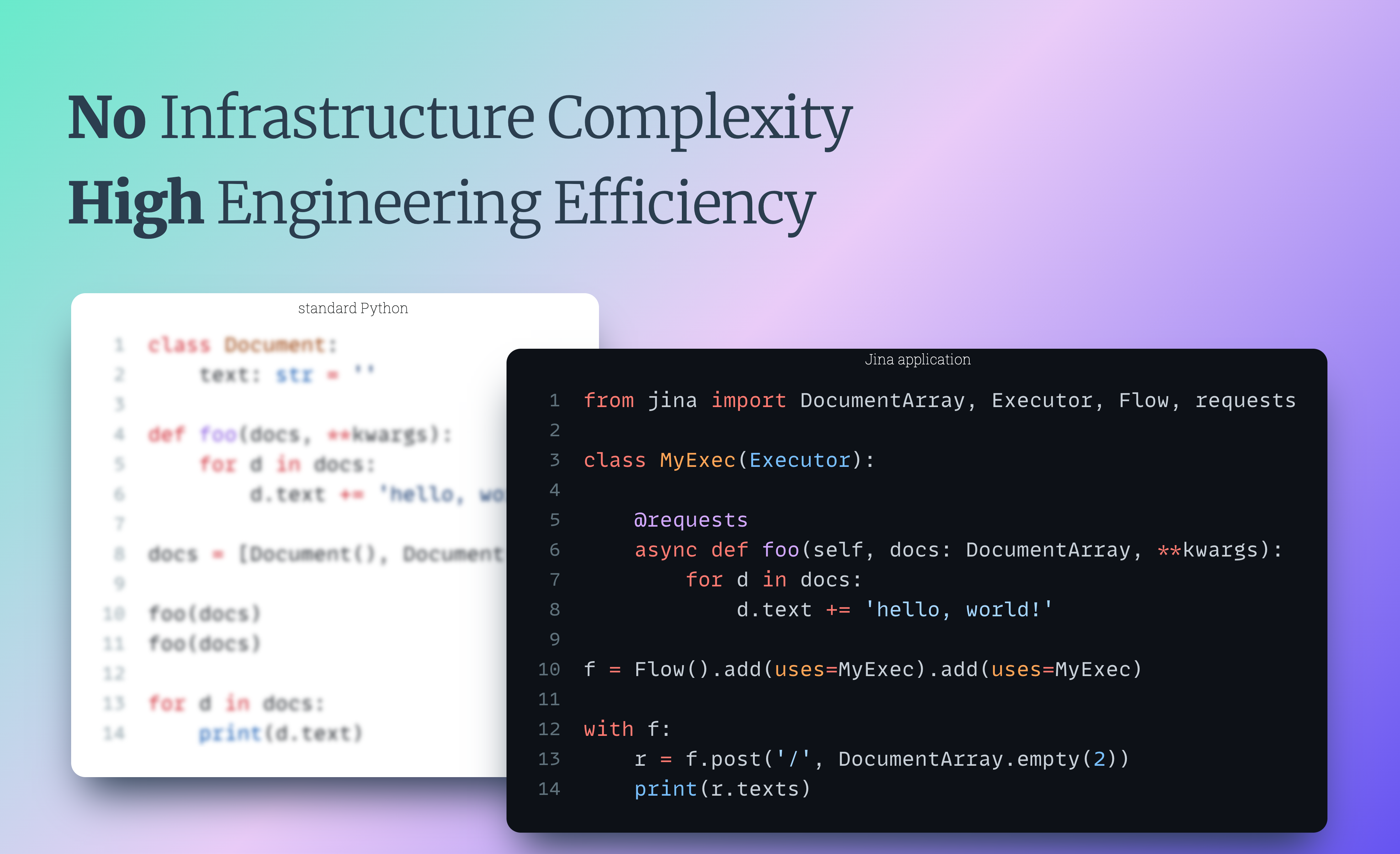
Why not just use standard Python to build that microservice and pipeline? Jina accelerates time to market of your application by making it more scalable and cloud-native. Jina also handles the infrastructure complexity in production and other Day-2 operations so that you can focus on the data application itself.
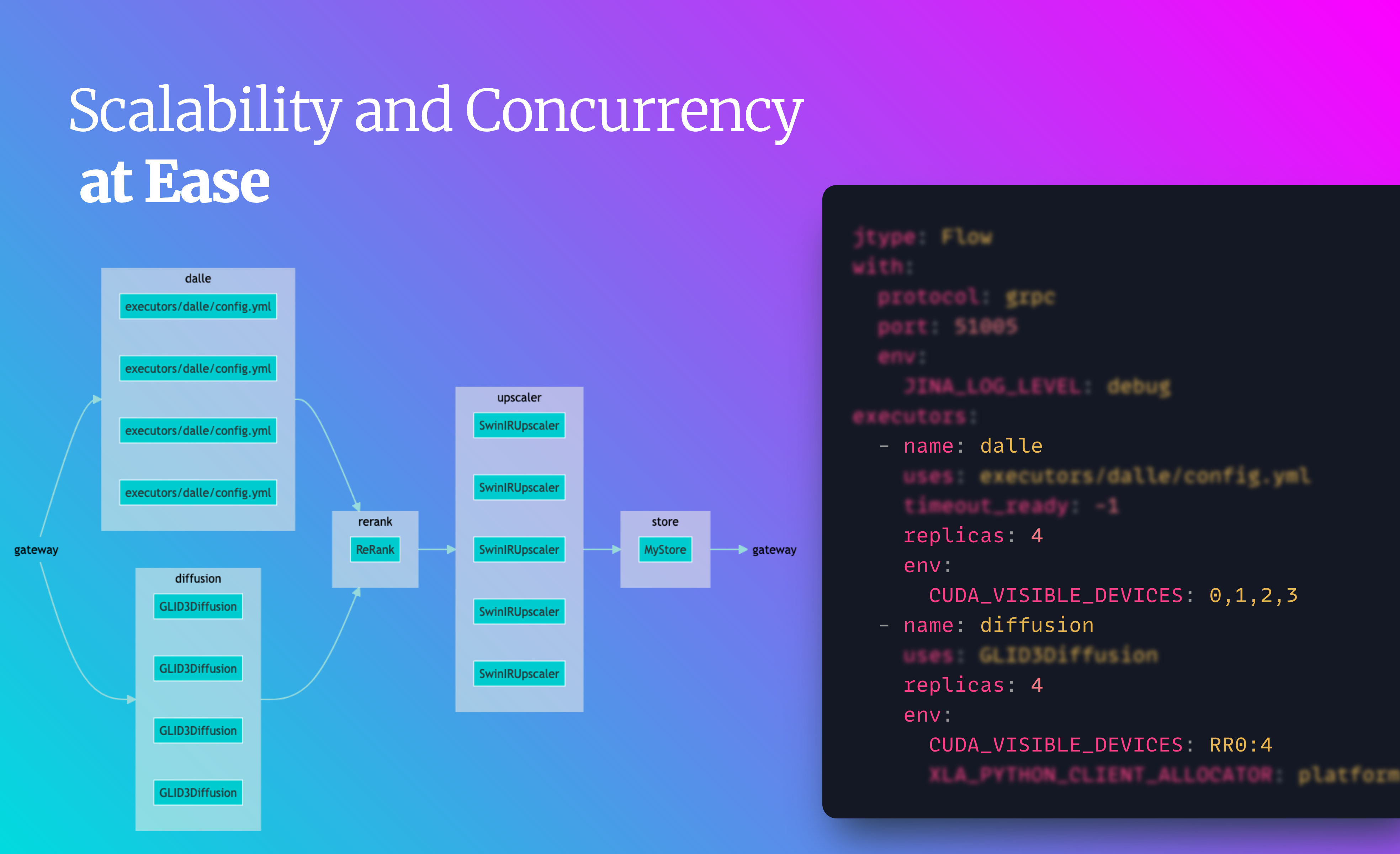
### Easy scalability and concurrency
Jina comes with scalability features out of the box like [replicas](https://docs.jina.ai/concepts/orchestration/scale-out/#replicate-executors), [shards](https://docs.jina.ai/concepts/orchestration/scale-out/#customize-polling-behaviors) and [dynamic batching](https://docs.jina.ai/concepts/serving/executor/dynamic-batching/).
This lets you easily increase your application's throughput.
Let's scale a Stable Diffusion Executor deployment with replicas and dynamic batching:
* Create two replicas, with [a GPU assigned for each](https://docs.jina.ai/concepts/flow/scale-out/#replicate-on-multiple-gpus).
* Enable dynamic batching to process incoming parallel requests together with the same model inference.
| Normal Deployment | Scaled Deployment |
|---|---|
|
|
jina hub new
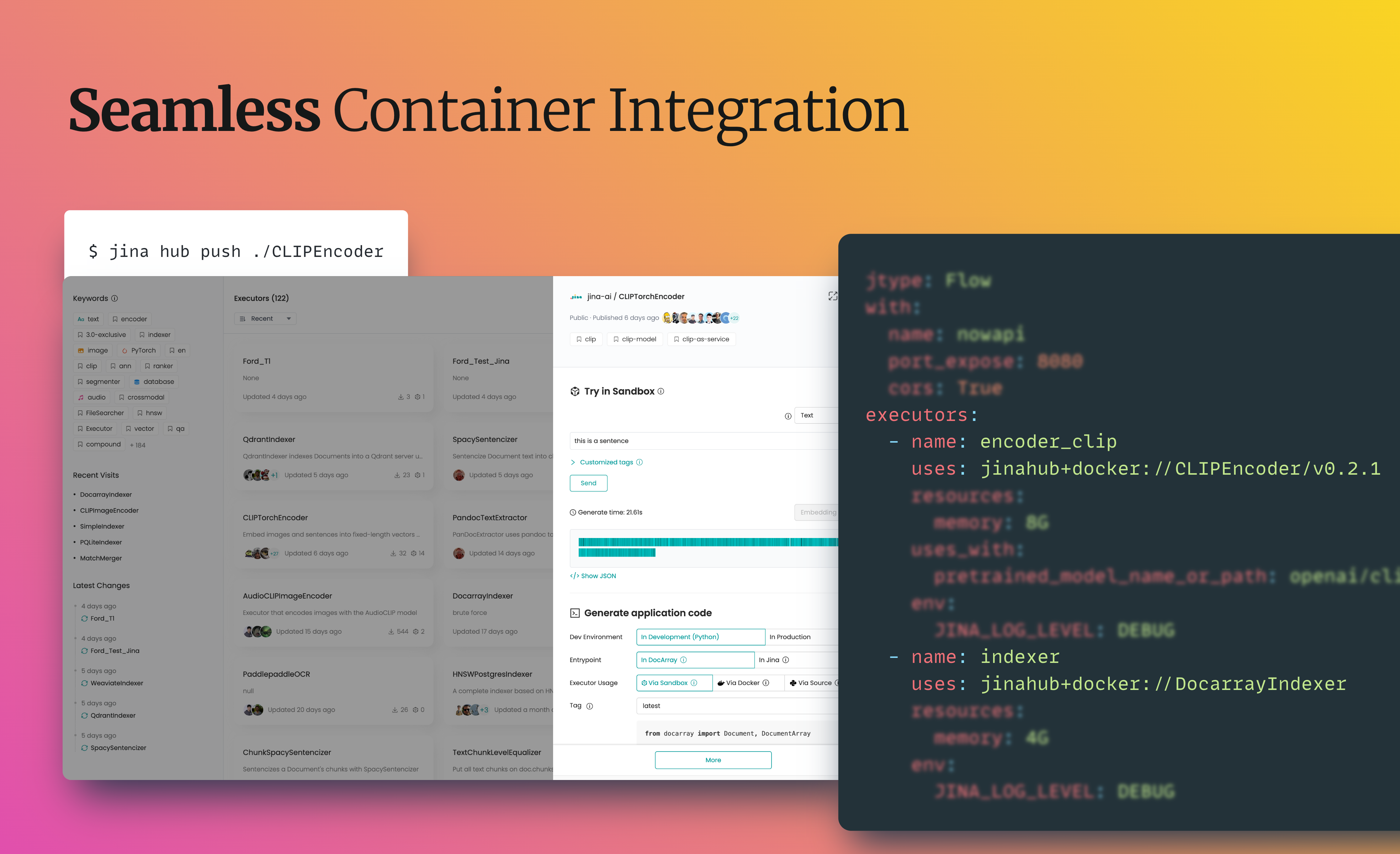
To push it to Executor Hub:
jina hub push .
To use a Hub Executor in your Flow:
| | Docker container | Sandbox | Source |
|--------|--------------------------------------------|---------------------------------------------|-------------------------------------|
| YAML | `uses: jinaai+docker://jina export kubernetes flow.yml ./my-k8s
kubectl apply -R -f my-k8s
And so is Docker Compose:
jina export docker-compose flow.yml docker-compose.yml
docker-compose up
> **Note**
> You can also export Deployment YAML to [Kubernetes](https://docs.jina.ai/concepts/executor/serve/#serve-via-kubernetes) and [Docker Compose](https://docs.jina.ai/concepts/executor/serve/#serve-via-docker-compose).
Likewise, tracing and monitoring with OpenTelemetry is straightforward:
from docarray import DocumentArray
from jina import Executor, requests
class Encoder(Executor):
@requests
def encode(self, docs: DocumentArray, **kwargs):
with self.tracer.start_as_current_span(
'encode', context=tracing_context
) as span:
with self.monitor(
'preprocessing_seconds', 'Time preprocessing the requests'
):
docs.tensors = preprocessing(docs)
with self.monitor(
'model_inference_seconds', 'Time doing inference the requests'
):
docs.embedding = model_inference(docs.tensors)
You can integrate Jaeger or any other distributed tracing tools to collect and visualize request-level and application level service operation attributes. This helps you analyze request-response lifecycle, application behavior and performance.
To use Grafana, [download this JSON](https://github.com/jina-ai/example-grafana-prometheus/blob/main/grafana-dashboards/flow-histogram-metrics.json) and import it into Grafana:
To trace requests with Jaeger:
What cloud-native technology is still challenging to you? [Tell us](https://github.com/jina-ai/jina/issues) and we'll handle the complexity and make it easy for you.
## Support
- Join our [Slack community](https://jina.ai/slack) and chat with other community members about ideas.
- Join our [Engineering All Hands](https://youtube.com/playlist?list=PL3UBBWOUVhFYRUa_gpYYKBqEAkO4sxmne) meet-up to discuss your use case and learn Jina's new features.
- **When?** The second Tuesday of every month
- **Where?**
Zoom ([see our public events calendar](https://calendar.google.com/calendar/embed?src=c_1t5ogfp2d45v8fit981j08mcm4%40group.calendar.google.com&ctz=Europe%2FBerlin)/[.ical](https://calendar.google.com/calendar/ical/c_1t5ogfp2d45v8fit981j08mcm4%40group.calendar.google.com/public/basic.ics))
and [live stream on YouTube](https://youtube.com/c/jina-ai)
- Subscribe to the latest video tutorials on our [YouTube channel](https://youtube.com/c/jina-ai)
## Join Us
Jina is backed by [Jina AI](https://jina.ai) and licensed under [Apache-2.0](./LICENSE).Please login to review this project.
No reviews for this project yet.

Open source distributed and RESTful search engine.
Peer based, decentralized search engine server.
Private web search engine.
Comments (0)
Please login to join the discussion on this project.